
An NFC Google Review Card is a simple, contactless tool that makes it easier for customers to leave Google reviews. By tapping an NFC-enabled smartphone on the card, customers can open a Google review link and share their feedback without manually searching for the business.
Available in different materials, shapes, and designs, NFC review cards can also be customized with a company logo, QR code, and call-to-action message.
This guide explains how NFC Google Review Cards work, how to set them up, how they compare with QR codes, and what businesses should consider when choosing an NFC review card supplier.
What Is an NFC Google Review Card?
An NFC Google Review Card is a physical card containing a Near Field Communication (NFC) chip programmed with a digital link. When a customer taps a compatible smartphone on the card, the phone reads the NFC tag and opens the programmed destination, such as a Google Business Profile review page.
Unlike traditional paper review cards, NFC review cards do not require customers to type a website address manually. They directly connect a physical product to an online review page.
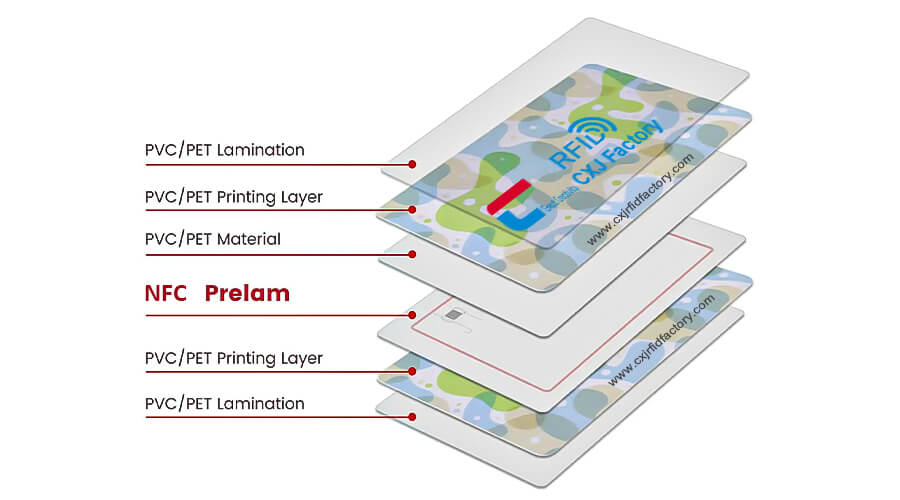
A typical NFC Google Review Card includes:
- NFC chip: Stores the information needed to open the review link.
- Card body: Can be made from PVC, PET, wood, or other suitable materials.
- Printed design: May include a logo, instructions, and a call to action such as “Tap to Leave a Review.”
- Optional QR code: Provides an alternative way for customers to access the same review link.
How Does an NFC Google Review Card Work?
NFC technology enables short-range wireless communication between compatible devices. In a Google review application, the NFC chip typically stores a URL that directs customers to the business’s review page.
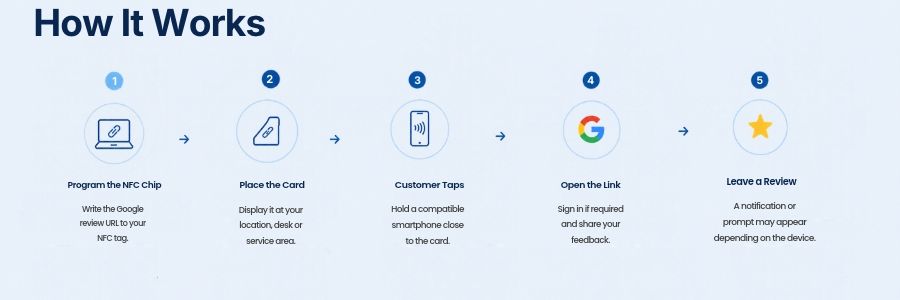
The process is straightforward:
- Program the NFC chip. Write the business’s Google review URL to a compatible NFC tag.
- Place the card in a convenient location. Display it at a checkout counter, reception desk, restaurant table, or service area.
- Customer taps the card. The customer holds a compatible smartphone close to the NFC antenna in the card.
- The phone opens the link. A notification or prompt may appear, depending on the device and its settings.
- The customer leaves a review. The customer opens the Google review page, signs in if required, and submits honest feedback.
How to Set Up an NFC Google Review Card
Setting up an NFC Google Review Card involves obtaining the correct review link, programming the NFC tag, and testing the finished card.
Step 1: Get Your Google Review Link
First, make sure your business has an eligible Google Business Profile.
Open your profile in a desktop browser, navigate to the review-sharing option, and select the option to get more reviews. Copy the review link provided by Google.
You can follow Google’s official instructions here: Create a Google link or QR code to request reviews.
Before proceeding, open the link on a smartphone to confirm that it directs customers to the correct business.
Step 2: Choose a Compatible NFC Tag
Select an NFC chip that meets your requirements for smartphone compatibility, memory capacity, and intended use.
For many review-card applications, common NFC chips from the NTAG21x family may be suitable. The final choice should depend on the URL length, required features, reader compatibility, and card design.
The chip is normally embedded inside the card, so customers can use the finished product without handling the chip itself.
Step 3: Write the Review URL to the NFC Chip
Use a compatible NFC-enabled smartphone or NFC writer to write the Google review URL to the tag.
A typical workflow is:
- Open a compatible NFC writing application.
- Create a URL record.
- Paste the Google review link.
- Place the NFC tag near the phone’s NFC antenna.
- Write the record to the tag.
- Read the tag again to verify the saved URL.
For larger orders, companies can collaborate with the CXJ RFID factory to program and test the cards before shipment.
Step 4: Test the Card Before Use
NFC performance can vary depending on the phone, antenna position, card construction, and nearby materials.
Check that:
- The correct review page opens.
- The link works on supported iOS and Android smartphones.
- The card can be read at a practical tapping distance.
- Any printed QR code leads to the same destination.
- The card design and printing meet the intended quality requirements.
Benefits of Using an NFC Google Review Card
-
Simplifies Access to the Review Page
Customers do not need to search for the business name manually. A tap can take them directly to the review link, reducing the number of steps involved.
-
Supports In-Person Customer Engagement
Businesses can display review cards immediately after a service, purchase, or dining experience. This makes it easier to invite customers to share feedback while the interaction is still fresh.
-
Provides a Reusable Marketing Tool
Unlike disposable paper slips, a durable NFC card can be used repeatedly. Businesses can keep cards at reception desks, checkout counters, and service stations.
-
Reinforces Brand Recognition
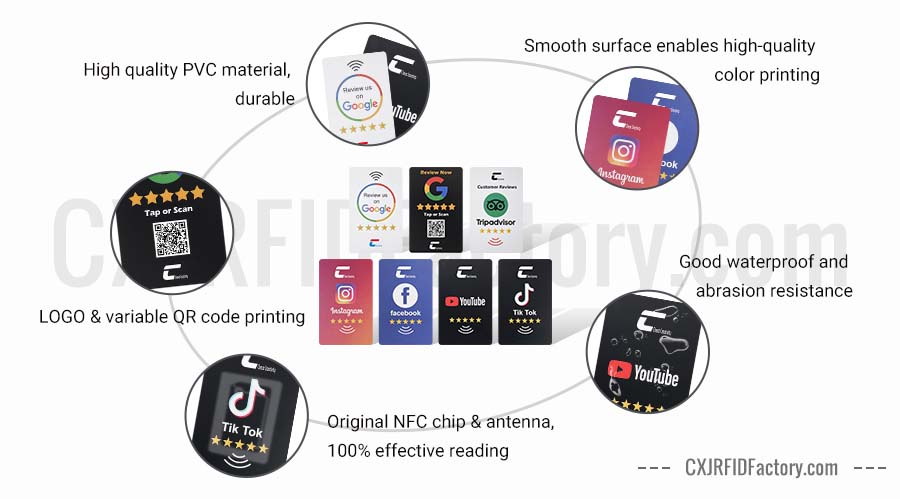
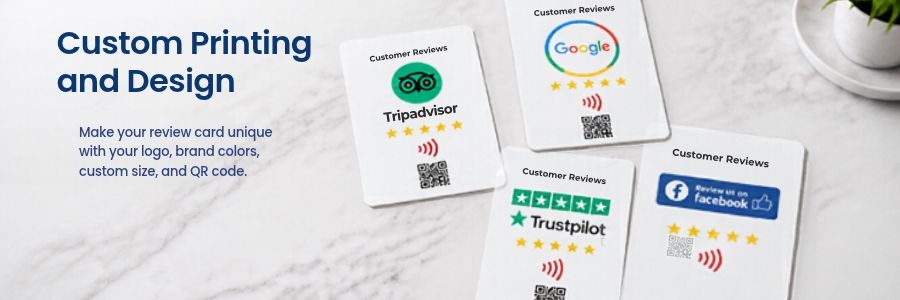
Custom printing allows businesses to include their logo, brand colors, instructions, and other visual elements. A well-designed card can fit naturally into the customer experience.
-
Offers Flexible Product Customization
Businesses can select card materials, sizes, shapes, printing methods, and NFC chip options according to their application and budget.
-
Can Complement Other Review Channels
An NFC review card can work alongside review links in email, WhatsApp messages, receipts, and other customer communications. Businesses can use multiple channels without relying on a single method.
Who Can Benefit from NFC Google Review Cards?
NFC Google Review Cards are useful for businesses that interact with customers in person and want a convenient way to share their review links.
Restaurants and Cafes
Place a card near the checkout counter or on a suitable table display. Customers can tap the card after their meal to access the restaurant’s Google review page.
Hotels and Accommodation Providers
Display NFC review cards at reception or other appropriate customer-service areas. Guests can access the review page after their stay or service interaction.
Retail Stores
Use branded cards at checkout counters to make it easy for customers to find the store’s review page after a purchase.
Salons and Beauty Services
Place a card at the reception desk or service area so customers can access the business’s review link after an appointment.
Automotive and Repair Services
Provide an NFC review card at the service desk after a completed repair, maintenance visit, or customer consultation.
Professional and Local Service Businesses
Consultants, cleaning companies, fitness studios, and other service providers can use NFC cards to connect in-person interactions with online feedback.
The most suitable placement depends on the customer journey and the type of business.
NFC Google Review Card vs. NFC Google Review Stand
Both products help customers access a Google review link through NFC, but they serve slightly different purposes. Both formats can be customized according to the business’s branding and usage requirements.
| Feature | NFC Google Review Card | NFC Google Review Stand |
| Form | Flat card | Freestanding display |
| Placement | Handheld or placed on a counter | Countertop or reception desk |
| Portability | Easy to carry and distribute | Better suited to a fixed location |
| Branding | Printed logo, message, and QR code | Larger display area for branding and instructions |
| Typical applications | Staff handouts, customer packages, mobile services | Restaurants, hotels, shops, reception areas |
NFC Google Review Card vs. QR Code Review Card
NFC and QR codes can direct customers to the same Google review page, but they provide different ways to access it.
For many businesses, combining NFC and QR codes on one card is a practical solution. Customers can choose whichever method works best for their device.
| Feature | NFC Review Card | QR Code Review Card |
| Interaction | Tap a compatible phone on the card | Open the camera or scanner and scan the code |
| Internet access | Usually needed to load the review page | Usually needed to load the review page |
| Phone compatibility | Depends on NFC support and device settings | Depends on camera or QR scanning support |
| Printed code | Optional | Required |
| Physical appearance | Can have a clean design with an optional QR code | Must display a readable QR code |
| Best use | Contactless interaction and reusable branded cards | Broad accessibility and low-cost printing |
How to Choose the Best NFC Google Review Card
When sourcing NFC Google Review Cards for your business, consider the following factors.
NFC Chip Compatibility
Choose a chip that works with your intended devices and application. Confirm the chip model, memory capacity, and encoding requirements with the manufacturer.
Material and Durability
PVC cards are a common option for everyday business use. Other materials, such as PET or wood, may suit different branding or environmental preferences.
Consider the expected frequency of use, surface finish, and resistance to normal wear.
Custom Printing and Design
CXJ RFID Factory offers customized NFC card solutions to help businesses create branded review cards. The printed instructions should be clear and concise, such as “Tap or Scan to Leave a Google Review.”
Encoding and Quality Control
CXJ RFID Factory can program the Google review URL and test the finished cards before shipment.
For customized orders, confirm the review link, chip type, printing details, sample approval process, and packaging requirements.
Order Quantity and Lead Time
CXJ RFID Factory provides customized NFC card solutions for different business needs. Contact us with your order quantity and customization requirements to discuss pricing and delivery time.
Manufacturer Experience
With 21 years of industry experience, CXJ RFID Factory specializes in RFID and NFC products, offering customized solutions for businesses seeking reliable NFC card manufacturing.
Conclusion
An NFC Google Review Card connects a physical customer interaction with an online review page through a simple tap.
Use the card to invite genuine and unbiased customer feedback rather than treating it as a guarantee of positive reviews.
Looking for a customized NFC Google Review Card for your business?
CXJ RFID Factory, operated by SHENZHEN CHUANGXINJIA RFID TAG CO., LTD, is an RFID and NFC manufacturer with 21 years of industry experience. The company integrates research and development, production, and marketing, supporting customized RFID and NFC products for business applications.
Contact CXJ RFID Factory to discuss your NFC card requirements, including chip selection, custom printing, URL encoding, and bulk production options.

FAQ
1. Do NFC Google Review Cards work with iPhones and Android phones?
Many NFC-enabled iPhones and Android phones can read compatible NFC tags. However, behavior depends on the phone model, operating system, NFC settings, tag type, and how the tag is programmed.
2. Do customers need to install an app to use an NFC review card?
In most standard URL-based applications, customers do not need a dedicated NFC app. A compatible phone can read the tag and open the URL through its normal system interface.
3. Does an NFC Google Review Card need a battery?
No. A standard passive NFC tag does not require a battery. It receives the energy needed for communication from the nearby NFC reader.
4. Can the Google review link be changed after programming?
In many cases, an NFC tag can be rewritten if it has not been permanently locked and the chip supports rewriting. However, this depends on the tag configuration and the way the URL is stored. Confirm the encoding and locking options before production.
5. Can one NFC card be used for multiple business locations?
A card programmed with one direct review URL will normally open that specific destination. Businesses operating multiple locations should assign the correct link to each location’s cards or use a managed landing page if their workflow requires it.
6. Does an NFC review card guarantee more Google reviews?
No. An NFC review card makes the review link easier to access, but it cannot guarantee that customers will submit reviews. Results depend on customer satisfaction, the timing of the request, the ease of the process, and other factors.
7. Can an NFC review card include a QR code?
Yes. An NFC card can be printed with a QR code that leads to the same Google review link. This gives customers two ways to access the page.
8. Can NFC Google Review Cards be customized with a company logo?
Yes. Depending on the product design and manufacturing process, cards can be customized with company logos, colors, text, QR codes, and different materials or dimensions.
9. Can an NFC Google Review Card be used without internet access?
The NFC tag can transmit its stored URL without an internet connection, but the phone generally needs internet access to load the Google review page and submit a review.
10. Are NFC Google Review Cards suitable for wholesale orders?
Yes. Businesses, distributors, marketing agencies, and multi-location operators can order customized cards in bulk. Before placing a large order, confirm the chip specification, encoding, artwork, sample quality, and delivery schedule with the supplier.


